
Today Hye began the GPTers cohort 23 study on running an AI server around the clock.
The Week 1 assignment was intentionally small: GET /hello, one custom GET endpoint,
and one custom POST endpoint that accepts a JSON body.
Rather than treating the result as something made only to complete the assignment,
we connected it to Hermes and Meow Tower as a first operational feature that could keep growing after Week 1.
Keep the assignment small, but attach the result to a structure worth keeping.
1. Turning HTTP basics into an operations surface
2. API basics for first-time readers
If APIs are unfamiliar, think of an API as an agreement for how a screen and a server talk to each other. When someone clicks a button or submits a form, the browser sends a request. The Meow Tower server processes it and returns a response.
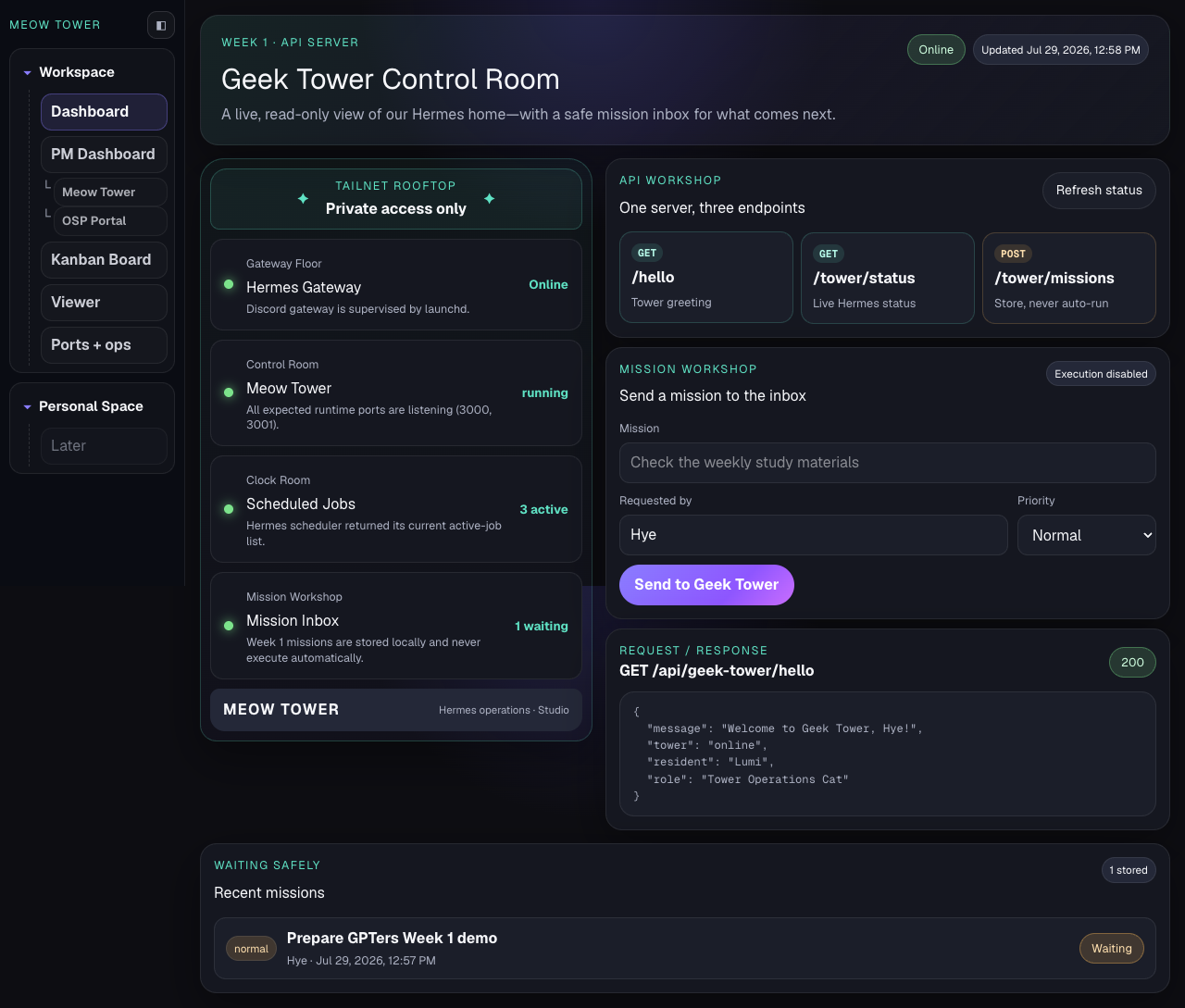
GET is normally used to read information. POST is normally used to create data or request processing on the server. Geek Tower currently has three core endpoints.
/api/geek-tower/helloThe simplest greeting that proves the server can respond/api/geek-tower/statusReads Hermes and runtime status and returns JSON/api/geek-tower/missionsSends title, requester, and priority as JSON to create a missionExample POST request and response
Request body
{
  "title": "Prepare GPTers Week 1 demo",
  "requestedBy": "Hye",
  "priority": "normal"
}

Response
201 Created
{
  "accepted": true,
  "status": "waiting"
}
3. The four floors visible today
Geek Tower does not simply expose raw commands from inside the server. It collects several operational signals and translates them into four floors that a person can understand at a glance.
4. Why every mission says Waiting
Every new mission is created with a waiting status.
That is not an unfinished feature. It is an intentional safety boundary.
submit ≠ execute receive ≠ authorize waiting = stored safely, not running The mission form currently accepts a request and stores it in a local JSON file. There is no worker yet that picks it up and uses real tools. Waiting therefore means “the request has not been lost, but execution has not been authorized.”
This separation matters because an AI agent can modify files, run commands, or send messages. A future design should let Hye inspect the mission and its permissions, then press Approve before any worker starts.
5. Making both success and failure visible
A 422 does not mean the server is broken.
If the mission title is empty, for example, it means the server clearly rejected a request that did not satisfy its input contract.
Showing both success and failure in the Request / Response panel lets a beginner see the HTTP conversation behind the interface.
6. Verifying execution rather than merely writing code
- 4/4 targeted Geek Tower tests passed
- Production build passed and all three API routes appeared
- The launchd-supervised preview restarted successfully
- Local and private Tailnet routes returned HTTP 200
- Browser navigation, mission submission, and persistence worked
- The missing-title path returned 422 and the browser console remained clean
- Screenshot-based visual QA found no clipping or overlap
7. Future Geek Tower — the to-be dashboard model
The long-term goal is not merely a more decorative status page. Geek Tower should become an operations control plane for Hermes: a central surface for observing the system, authorizing execution, intervening when necessary, and reviewing results.
To-be mission lifecycle
Exceptional states such as Blocked, Failed, Cancelled, and Timed out will matter too.
Status should become an operational language that tells a person who needs to act next, not a decorative label.
Expansion aligned with the four study weeks
8. What I learned
Visible operations should come before autonomous execution.
An AI dashboard should not become another chat window. It should be a control plane that shows what is alive, what is waiting, and what requires human authority.
A month ago, we described a family of dashboards as an architectural idea. Today we opened the first operational floor for real. The tower is still small, but our digital household now has a door that can observe its systems and receive work safely. 🏰🐈⬛🐾